How to Use Claude for Data Analysis: A Setup That Checks Its Own Numbers
Use Claude for data analysis by writing the metric down, querying the real rows, and passing a check the writer never saw before you trust the number.
TL;DR
Pasting a file into chat is not data analysis.
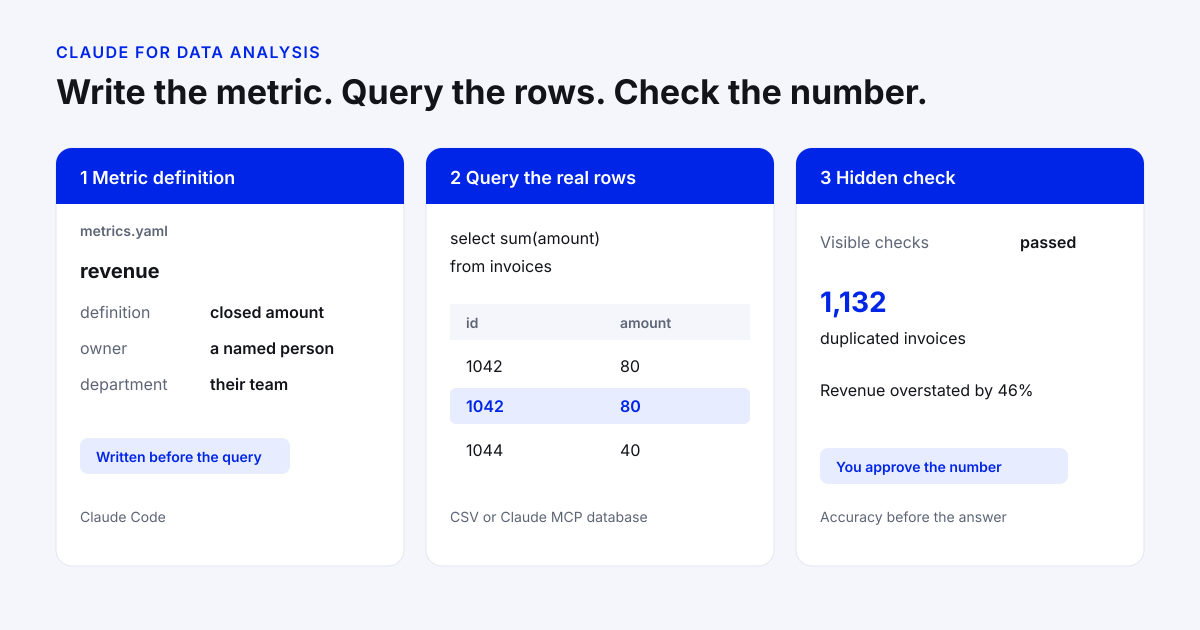
To use Claude for data analysis, write the metric down, point it at the real rows, and do not accept the number until a check the writer never saw comes back clean.
I have watched a strong model fail to reach the data and still report findings with full confidence.
The sentences were clean. Nothing had queried the table.
Most AI problems are really data problems. The model is rarely what fails.
So the search "how to use Claude for data analysis" is a setup question. The prompt is the last step, not the first.
Where the work should run
People type "claude.ai for data analytics" and land on three Anthropic products. I do not ask them to do the same job.
Claude.ai (Anthropic) is the chat. The Claude Cowork help center puts Chat and Claude Cowork on the same message box. Some accounts are already on a combined box, and that page says the steps look different then. With code execution and file creation, chat can write and run code, including Python, on files you give it. The same page says it can process CSV and TSV files and return a PNG chart. XLSX uploads need that feature on. CSV does not.
Use Claude.ai when the file is already the source and you will re-check the number. Do not use it to invent a metric the business will repeat next week.
Claude Code (Anthropic) is the agentic coding tool. The overview says it reads your codebase, edits files, and runs commands, in the terminal, an IDE, the desktop app, or the browser. When the query is a command in that repo, that is how I run it.
The same page says a CLAUDE.md in the project is read at the start of every session. That is where I put the rules I refuse to retype. It also says you connect external data sources with MCP. The MCP reference lists querying a database as one of the things you can ask once a server is connected, instead of pasting an extract into the prompt.
Claude Cowork (Anthropic) uses the same agentic architecture as Claude Code, with no terminal. Anthropic's help center calls the product Claude Cowork. You describe an outcome and it takes on a multi-step task. The session runs in the cloud, in an isolated environment, and the code and shell commands run there. On the desktop app it can also read local files you connect.
For data files, that page lists outlier detection, cross-tabs, time series, charts, and cleaning. Claude Cowork is on paid plans. The overview adds MCP connectors, skills, and plugins. A plugin with a local MCP server works through the desktop app only.
MCP is the Model Context Protocol, an open standard for connecting an AI application to external systems, including databases. Anthropic open-sourced it. It is not a metric layer. It does not know what "revenue" means in your warehouse.
| Product | Vendor | What the docs say | When I use it |
|---|---|---|---|
| Claude.ai | Anthropic | Code execution can analyze an uploaded CSV or TSV and chart it. XLSX needs that feature. | A file I will re-check by hand. |
| Claude Code | Anthropic | Reads the repo, runs commands, reads CLAUDE.md, and can query a database through MCP. | The metric file and the query live in a repo. |
| Claude Cowork | Anthropic | Same architecture as Claude Code, no terminal. The session runs in the cloud. Paid plans. | A multi-step pass without a terminal. |
The setup that checks its own numbers
Write the definition before the query
On a production AI system I built for a growing company, every metric sits in a YAML file. Each definition has an owner and a department.
If the name is not in that file, the model picks a sensible formula. Sensible is how a number gets into a deck that nobody can close.
This is a file, not a product feature. Put it where the session can read it. In the repo for Claude Code (Anthropic). In a connected folder, or in the cloud session, for Claude Cowork (Anthropic). Uploaded, or in the project, for Claude.ai (Anthropic). The code-execution help page says project files are available in that computing environment.
The model should read your definition. It should not write one in the same breath as the answer.
When the question is semantic layer vs ontology, and whether that layer is too much, read What a Knowledge Layer for Data Agents Actually Needs.
Give it a path to the rows
A paste is a story about the data. A query is the data.
The Claude Code MCP docs say to connect a server when you notice yourself copying data into chat. Once it is connected, Claude reads that system instead of the paste. Claude Cowork (Anthropic) reaches the same kind of connection as a connector.
If you do not have that path, say so in the answer. Upload the CSV, or point Claude Cowork at the file. Write that the number came from the file, not from the live table.
The longer split, access versus a playbook versus a worker, is in Skills vs MCP vs Agents for Data Teams and Data Agents for Analytics Teams.
Hide a check the writer cannot see
Anthropic publishes a Data plugin (also listed on the Claude marketplace). The README says it is built first for Claude Cowork, and that it also works in Claude Code. With a warehouse connection it can query, look at schema, and iterate. Without one, you paste SQL results or upload a CSV or Excel file.
The commands in that README:
/analyzeanswers a data question/explore-dataprofiles shape and quality before you trust the table/write-queryputs the SQL in the open/create-vizbuilds a chart/build-dashboardbuilds an HTML dashboard/validateQAs the analysis before you share it: methodology, accuracy, and bias
The Claude Cowork help center says a plugin you add is saved to your account, so it works in chat and in Claude Code as well as in Claude Cowork. The install lines in the plugin README are the Claude Code ones:
claude plugin marketplace add anthropics/knowledge-work-plugins
claude plugin install data@knowledge-work-plugins
/validate is a real check. The README does not say the check is hidden from the agent that wrote the query. I do not pretend that it is.
The hidden check is a separate pass, written before the build, that the builder is told not to read. That is the design in Data Factory, my open-source plugin for Claude Code (Anthropic). I am quoting the reference run in the README, not a client's books:
In the reference run, every visible check passed on the first build. The inspector's hidden checks still caught 1,132 duplicated invoices (revenue overstated by 46%) and 3 internal test accounts that made the August drop look 76% bigger and blamed the wrong customers. One rework loop later, every number matched finance — to the dollar.
Visible checks passed. The number was still wrong. A model that can see its own test can satisfy the test.
The README says the inspector writes those holdouts before the build, and that builders are told never to read them. One known total, written down before the prompt, is the same idea on a single CSV.
You approve twice
You approve the definition before anyone writes SQL. You approve the number after the hidden check.
The Data Factory README calls these the two human gates. Nothing ships on its own. I use the same two stops when the stack is a file and a chat.
What I load before I ask
A public playbook for Claude Code (Anthropic) is Data Analytics Skills. The README is 31 skills. The repo has 500+ GitHub stars. The data-quality skills are the ones I start with, because they ask what the metric means before they compute it.
Claude Code paths in that README are .claude/skills/ and ~/.claude/skills/.
The Claude Cowork help center says a task that runs code or creates a file uses more of your allowance than a short question. Keep the metric file short. Definitions, not every column.
3 things to do tomorrow
- Write five metrics in a file. Name, formula, owner, department. Start with the number people already argue about.
- Run one question against rows the model can actually read. Use Claude Code (Anthropic) when the repo is the source. Use Claude Cowork or Claude.ai when you only have a file. Save the query next to the answer, and name the source as a file or as the live table.
- Add one check the writer does not get to see. A total from the last close is enough. If the answer misses it, throw the answer out.
If you want to talk through your setup, grab 30 minutes: https://calendar.app.google/BPzZ7yuQicry4u7B7